File:Ray2PortingKit Ray2WinXP.png: Difference between revisions
Jump to navigation
Jump to search
Shrooblord (talk | contribs) Select Rayman2.exe to run emulating a Windows XP environment in the Wine Configuration (winecfg) option under the Tools tab of the Advanced option of the Properties window of the Rayman 2 Porting Kit executable. |
No edit summary |
||
| Line 1: | Line 1: | ||
Select Rayman2.exe to run emulating a Windows XP environment in the Wine Configuration (winecfg) option under the Tools tab of the Advanced option of the Properties window of the Rayman 2 Porting Kit executable. | Select Rayman2.exe to run emulating a Windows XP environment in the Wine Configuration (winecfg) option under the Tools tab of the Advanced option of the Properties window of the Rayman 2 Porting Kit executable. | ||
[[Category:Technical Information]] | |||


Latest revision as of 04:52, 18 December 2017
Select Rayman2.exe to run emulating a Windows XP environment in the Wine Configuration (winecfg) option under the Tools tab of the Advanced option of the Properties window of the Rayman 2 Porting Kit executable.
File history
Click on a date/time to view the file as it appeared at that time.
| Date/Time | Thumbnail | Dimensions | User | Comment | |
|---|---|---|---|---|---|
| current | 21:20, 2 December 2015 | 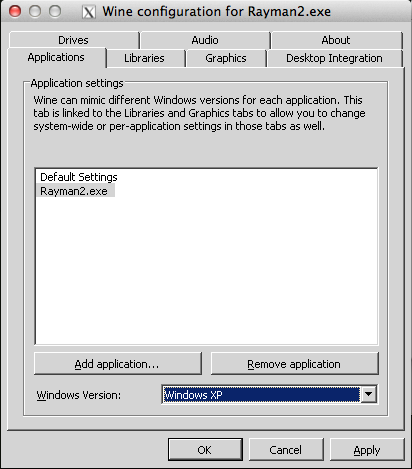 | 412 × 469 (24 KB) | Shrooblord (talk | contribs) | Select Rayman2.exe to run emulating a Windows XP environment in the Wine Configuration (winecfg) option under the Tools tab of the Advanced option of the Properties window of the Rayman 2 Porting Kit executable. |
You cannot overwrite this file.
File usage
The following page uses this file:
